Starting March 31, 2026, new Azure virtual networks will no longer provide automatic internet access for VMs. The defaultOutboundAccess property will be set to false by default, meaning VMs won’t be able to reach the internet unless you explicitly configure an outbound method.
This is a significant shift in Azure networking behavior that affects how you design and deploy infrastructure going forward.
TL;DR
- Deadline: March 31, 2026 — new VNets will have
defaultOutboundAccess = falseby default - Impact: VMs in new VNets won’t reach the internet without explicit configuration
- Existing infrastructure: No change — continues working as before
- Recommended solution: Add a NAT Gateway to your subnets
- Action now: Audit VMs in Azure Advisor and update your IaC templates
What Is Default Outbound Access?
Today, when you deploy a VM without configuring any outbound connectivity—no NAT Gateway, no public IP, no load balancer—Azure automatically assigns a Microsoft-managed public IP address behind the scenes. This gives your VM internet access without any configuration on your part.
While convenient for getting started, this implicit behavior has problems:
- Unpredictable IPs: The Microsoft-managed IP can change without notice, breaking firewall allowlists
- Security concerns: Implicit internet access contradicts Zero Trust principles
- Inconsistent behavior: Multi-NIC VMs and scale sets get different outbound IPs depending on timing
Default outbound access was a convenience feature, not a production-ready solution. Microsoft is now enforcing explicit configuration as the standard.
The Change: Private by Default
After March 31, 2026, the behavior changes for new virtual networks only:
| Scenario | Behavior |
|---|---|
| Existing VNets | No change—default outbound continues working |
| New VMs in existing VNets | No change—still get default outbound access |
| New VNets created after March 31, 2026 | defaultOutboundAccess = false—no internet without explicit config |
This applies across all deployment methods: Azure Portal, ARM templates, Bicep, Terraform, PowerShell, and CLI.
The change is based on when the VNet was created, not the VM. A VM deployed after the deadline into an existing VNet will still have default outbound access.
Why This Matters
If you’re deploying new infrastructure after March 31, 2026, your VMs won’t have internet access unless you plan for it. This affects:
- Package installations (apt, yum, pip, npm)
- Windows activation and updates
- Downloading dependencies during deployment
- Connecting to external APIs and services
- Any workload that needs to reach the internet
Your existing infrastructure continues working, but any new VNets you create will require explicit outbound configuration from day one.
How Azure Determines Outbound Connectivity
Azure evaluates outbound connectivity in a specific order of precedence. Understanding this flow is key to planning your migration:
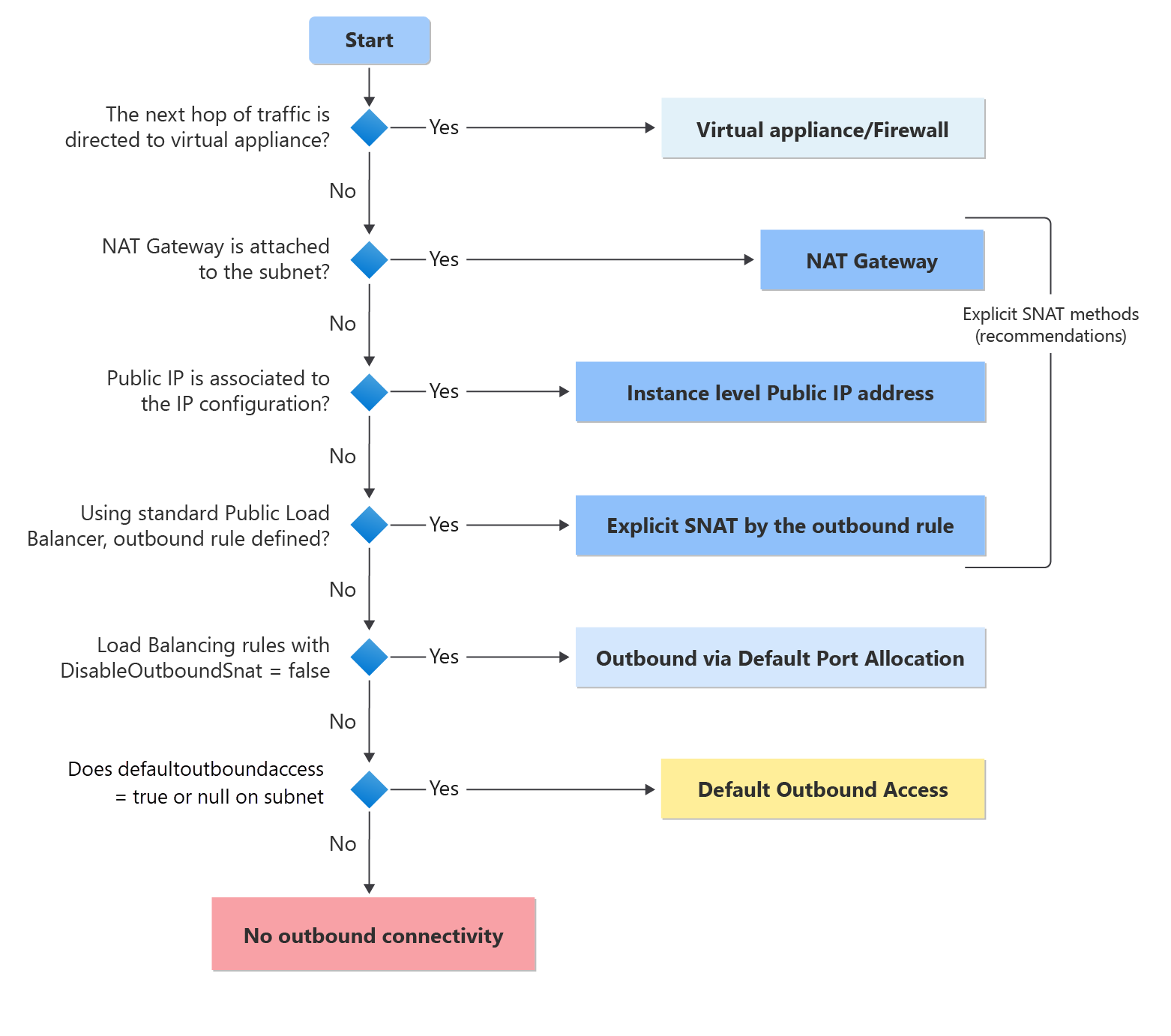 Decision tree showing how Azure determines the outbound method for a VM. Source: Microsoft Learn
The decision tree shows that Azure checks for explicit methods first (blue boxes), then falls back to default outbound access (yellow). After March 31, 2026, new VNets will skip that yellow box entirely—landing at “No outbound connectivity” (red) if no explicit method is configured.
For the full details on this change, see Default outbound access for VMs in Azure on Microsoft Learn.
Explicit Outbound Methods
The blue boxes in the diagram represent your options. Choose based on your requirements:
| Method | Best For |
|---|---|
| Virtual Appliance/Firewall | Centralized egress control, FQDN filtering, logging |
| NAT Gateway | Most scenarios—simple, scalable, static IPs |
| Instance Public IP | Individual VMs needing their own public IP |
| Load Balancer outbound rules | Already using a Standard Load Balancer |
For most workloads, NAT Gateway is the recommended choice. It provides static, customer-owned public IPs at the subnet level with no per-VM configuration.
resource natGateway 'Microsoft.Network/natGateways@2023-11-01' = {
  name: 'nat-gateway'
  location: location
  sku: { name: 'Standard' }
  properties: {
    publicIpAddresses: [{ id: publicIp.id }]
  }
}

resource vnet 'Microsoft.Network/virtualNetworks@2023-11-01' = {
  name: 'vnet-main'
  location: location
  properties: {
    addressSpace: { addressPrefixes: ['10.0.0.0/16'] }
    subnets: [{
      name: 'subnet-vms'
      properties: {
        addressPrefix: '10.0.1.0/24'
        natGateway: { id: natGateway.id }
        defaultOutboundAccess: false
      }
    }]
  }
}
What You Should Do Now
1. Audit Your Current Environment
Check Azure Advisor for VMs using default outbound access:
- Open Azure Advisor → Operational Excellence
- Look for: “Add explicit outbound method to disable default outbound”
2. Update Your IaC Templates
Add explicit outbound configuration to your Bicep, Terraform, or ARM templates now. This ensures new deployments are ready for the change.
For NAT Gateway in Bicep, add to your subnet:
natGateway: { id: natGateway.id }
defaultOutboundAccess: false
3. Plan for New Projects
Any new VNet created after March 31, 2026 needs an outbound method. Factor NAT Gateway (or your chosen method) into architecture decisions and budget.
Considerations for Private Subnets
When you set defaultOutboundAccess: false, keep these points in mind:
Windows VMs still need to reach activation servers. NAT Gateway handles this automatically, but if using Azure Firewall, allow:
kms.core.windows.net(port 1688)*.windowsupdate.microsoft.com
Azure Storage in the same region remains accessible without explicit outbound—Azure handles this internally.
Load balancer backend pools configured by IP address (not NIC) still use default outbound access. Pair with NAT Gateway for consistent behavior.
Conclusion
This change enforces a security best practice: explicit over implicit. While existing infrastructure continues working, any new VNet deployments after March 31, 2026 require you to think about outbound connectivity upfront.
Action items:
- Review Azure Advisor for affected VMs in your current environment
- Add NAT Gateway configuration to your IaC templates
- Factor explicit outbound into new architecture designs
Related Posts: